
Cell references, and what the dollar sign locks
A reference without dollar signs is relative: copy the formula down a row and B4 becomes B5. A dollar sign freezes the part it precedes, so $B$1 stays B1 wherever the formula is copied. Mixed forms lock one half: B$1 keeps the row but lets the column move, and $B1 does the opposite.

This is the part of Excel that most often produces a column where the first answer is right and everything underneath it is zero. The formula was correct. Copying it moved something that should have stayed still.
The rule is small and the consequences are not. A reference moves when you copy it unless you tell it not to, and the dollar sign is how you tell it. Once you can say in advance what a copied formula will become, this stops being a source of bugs and becomes the thing that lets one formula fill an entire table.
Copying rewrites the formula
When you copy a formula, Excel does not copy the text. It copies the relationship. A formula in C4 that refers to B4 is really saying the cell one to my left, and when that formula lands in C5 it says the same thing about its own position, which now means B5.
That behaviour is what makes a spreadsheet worth using. Write one calculation at the top of a column, fill it down, and every row does its own version of it. The trouble starts when part of the formula should not move.
One rate, every row
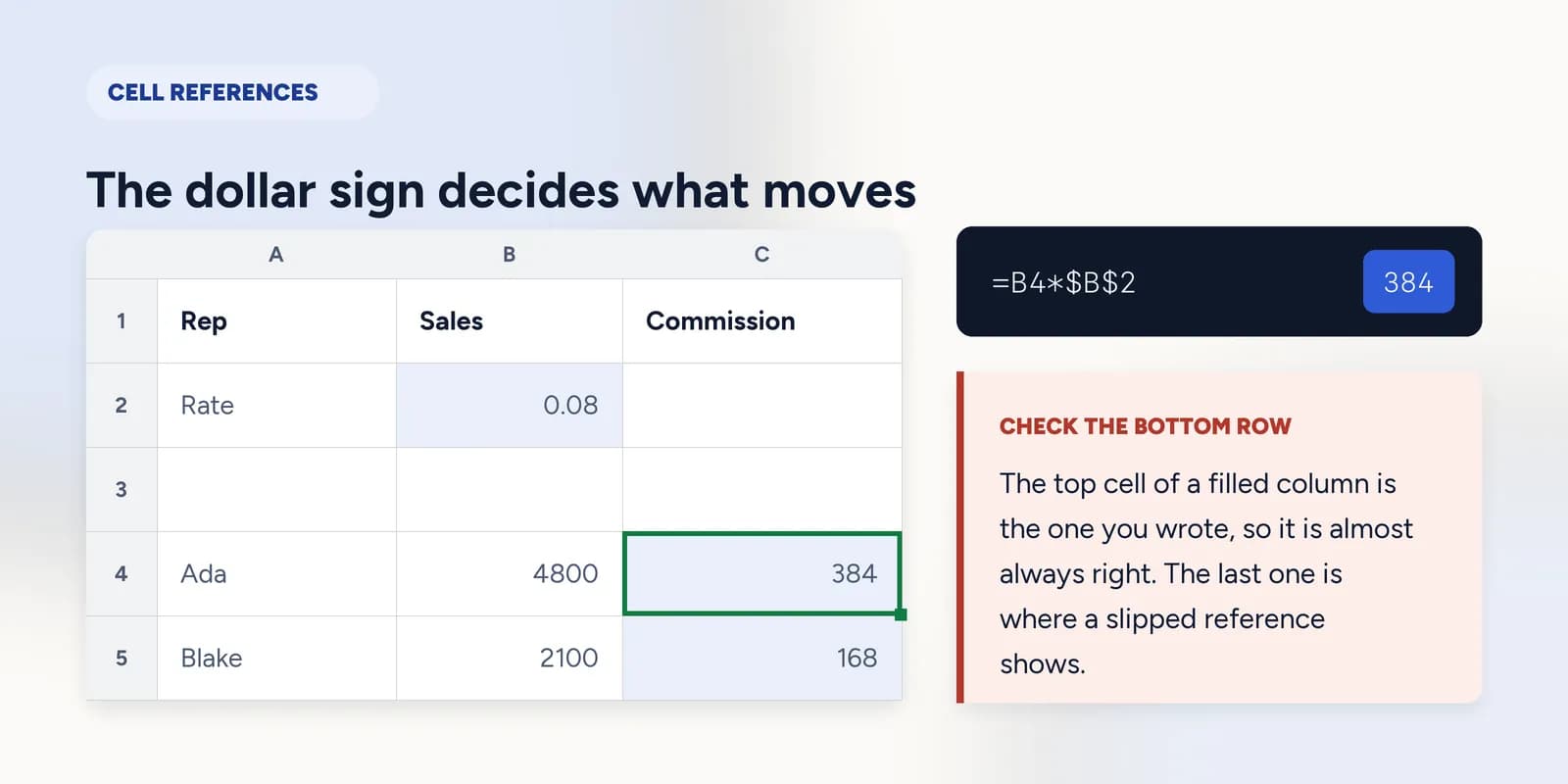
A commission rate lives in one cell and every row needs it. Written without dollar signs, the rate reference slides down with the formula: the first row reads B1 correctly, the second reads B2, the third reads B3, and those cells are empty. Empty cells multiply to zero, so the column fills with zeros under one correct answer.
| A | B | C | |
|---|---|---|---|
| 1 | Rate | 0.08 | |
| 2 | |||
| 3 | Rep | Sales | Commission |
| 4 | Ada | 4800 | 384 |
| 5 | Blake | 2100 | 168 |
| 6 | Chen | 7600 | 608 |
=B4*$B$1B4 is relative and becomes B5, B6 as the formula fills down. $B$1 is absolute and stays pointing at the rate.
Mixed references fill a whole table
A mixed reference locks one half and lets the other move, which is what you need for a grid where the row headings and the column headings are both inputs: a multiplication table, a price matrix, a set of scenarios at several rates.
- $B1 locks the column. Copied across, it keeps reading column B; copied down, the row moves with it.
- B$1 locks the row. Copied down, it keeps reading row 1; copied across, the column moves with it.
- Put one of each in the same formula and you can fill the entire table from the top-left cell without touching it again.
The way to get this right is to ask, for each reference, what you want it to do as the formula travels in each direction. The dollar goes in front of whichever part must not change.
Say it before you copy it
The habit worth building is predicting out loud. Before filling a formula down three rows, say what the third copy will read. If you cannot, the formula is not finished, and a column of wrong answers is cheaper to prevent than to find.
What goes wrong
These are the mistakes this part exists to prevent. Each one is reasonable, which is why people make it and why nothing on the sheet objects.
Leaving the rate reference relative
WhyThe first row gives the right answer, which is the row you look at, and the rest are zeros that look like no commission rather than like a broken formula.
InsteadLock it with $B$1 before filling down. Check the last row in the column as well as the first.
Putting dollar signs on everything to be safe
WhyIf locking fixes the broken formula, locking more feels safer still, and on a single row it makes no visible difference.
InsteadLock only what must not move. A fully absolute formula copied down a column repeats the same answer in every row, which is a different bug wearing the same face.
Writing $B1 when you meant B$1
WhyBoth look like a locked reference at a glance, and in a formula you only ever copy in one direction the wrong one often still works.
InsteadThe dollar locks what follows it. $B locks the column letter; $1 locks the row number. Fill in both directions once and the wrong one shows itself immediately.
Common questions
What does the dollar sign do in an Excel formula?
It stops the part of the reference that follows it from changing when the formula is copied. $B$1 is fixed in both directions, B$1 keeps its row, and $B1 keeps its column.
What is the difference between absolute and relative references?
A relative reference such as B4 shifts when the formula is copied, so filling down turns it into B5. An absolute reference such as $B$4 points at the same cell wherever the formula ends up.
What is the shortcut for an absolute reference in Excel?
F4 on Windows, Cmd+T on a Mac. Place the cursor on the reference in the formula bar and press it to cycle through B1, $B$1, B$1 and $B1.
Why does my formula return zero when I copy it down?
Almost always a reference that should have been locked. The copy is pointing one row lower than intended, at an empty cell, and anything multiplied by an empty cell is zero. Add dollar signs to the reference that should stay put.
When should I use a mixed reference?
When a formula has to fill both across and down and each direction needs a different anchor, such as a price table with quantities along the top and rates down the side.