
How to subtract in Excel, and why there is no SUBTRACT function
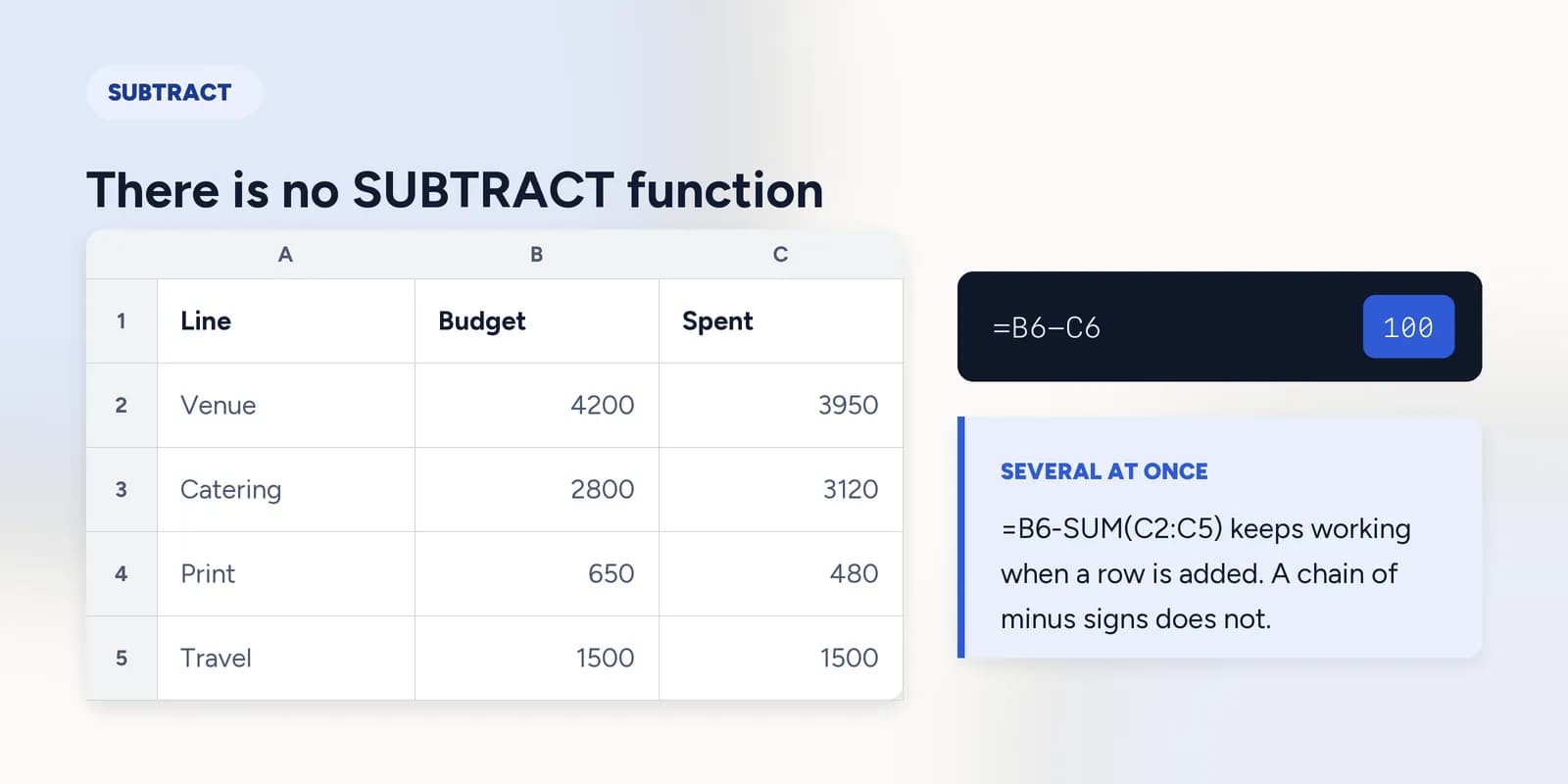
Excel has no SUBTRACT function. Subtraction is the minus sign: =B6-C6 takes the value in C6 away from the value in B6. To subtract several cells from a total, either chain them with minus signs or negate a SUM, as in =B6-SUM(C2:C5), which is the form that survives a new row being added.

Almost everybody arrives at this question the same way. They learn SUM, decide there must be a matching function for taking things away, search for SUBTRACT, and find nothing. There is nothing to find: Excel subtracts with the minus sign, and the only named arithmetic functions it has are SUM and PRODUCT.
That is the whole answer, and it takes a sentence. What is worth the rest of the page is the three places subtraction goes wrong: several cells at once, percentages, and a result that comes out as zero or as an error when the numbers in front of you are clearly fine.
One cell from another
Click the cell where you want the answer, type an equals sign, click the cell you are starting from, type a minus sign, click the cell you are taking away, and press Enter. That is the entire operation.
| A | B | C | |
|---|---|---|---|
| 1 | Line | Budget | Spent |
| 2 | Venue | 4200 | 3950 |
| 3 | Catering | 2800 | 3120 |
| 4 | 650 | 480 | |
| 5 | Travel | 1500 | 1500 |
| 6 | Total | 9150 | 9050 |
| 7 | Left | 100 |
=B6-C69,150 budgeted against 9,050 spent. A hundred left.
A negative answer is not an error and does not need handling. Catering went over, so B3-C3 comes out below zero and Excel shows it with a minus sign, which is exactly the information you wanted.
=B3-C3Catering is 320 over budget, reported as a negative number rather than an error.
Taking several cells off a total
Two forms do this and they are not equally good. Chaining minus signs works and is what most people write first. Subtracting a SUM is the one that keeps working when the table grows.
=B6-C2-C3-C4-C5Correct today. Add a row of spending under row 5 and this formula carries on subtracting exactly the four cells it was told about.
=B6-SUM(C2:C5)The same answer, and a range rather than a list. A row inserted inside the range is included automatically.
Subtracting a percentage
Taking twenty per cent off a price is the one case where the obvious formula is wrong often enough to be worth spelling out. You are not subtracting 20; you are subtracting twenty per cent of the number itself.
=B2*(1-0.2)The venue budget with twenty per cent taken off. Multiplying by 0.8 gives the same figure and reads less clearly about what it is doing.
=B2-B2*0.2The same answer written as a subtraction. It works because Excel does the multiplication before the subtraction.
When the answer is zero, or #VALUE!
- The answer is the whole of the first number, as if the second were zero. The cell being subtracted holds text rather than a number: check whether it sits on the left of its cell, and run ISNUMBER on it.
- The answer is #VALUE!. One of the cells holds text that cannot be read as a number at all, often a stray currency symbol or a space left by an export. Find and Replace over the column usually fixes the lot.
- The answer is a date, or a five-digit number where you expected a small one. Excel is treating the cells as dates. Set the format of the answer cell to General and the number appears.
- The answer is slightly off in the last decimal place. Both figures carry hidden decimals that formatting is rounding for display. ROUND the inputs where the values are actually decided.
The exercise is two cells and one minus sign, and the checker reads the formula in the cell: typing the right answer by hand does not pass.
Subtract one cell from another
There is no SUBTRACT function in Excel. Here is what to use instead. · 3 min · No account needed
What goes wrong
These are the four mistakes that come up again and again. Each one is reasonable. That is why people make it.
Searching for a SUBTRACT function
WhySUM exists, so a matching function for every operator is a reasonable guess, and the search results are full of people asking the same thing.
InsteadUse the minus sign. The only named arithmetic functions Excel has are SUM and PRODUCT, and PRODUCT is rarely worth it over the asterisk.
Chaining minus signs down a column
WhyIt mirrors what you would write on paper and gives the right answer on the table in front of you.
InsteadSubtract a SUM over a range instead. The chained version silently ignores every row added after it was written.
Subtracting the percentage rather than a percentage of the number
WhyTwenty per cent off reads like take twenty away, and on a figure near a hundred the two answers are close enough not to look wrong.
Instead=B2*(1-0.2). The percentage is always of something, and here it is of the number you are discounting.
Common questions
Is there a SUBTRACT function in Excel?
No. Excel subtracts with the minus sign: =B6-C6. SUM and PRODUCT are the only named arithmetic functions, and there is no DIVIDE either.
How do I subtract multiple cells in Excel?
=B6-SUM(C2:C5) takes a whole range off a total. Chaining minus signs works too but stops including cells the moment a row is added to the table.
How do I subtract a percentage in Excel?
=B2*(1-0.2) takes twenty per cent off the value in B2. To reverse a discount rather than apply one, divide instead: =B2/(1-0.2).
Why does my subtraction return #VALUE!?
One of the cells holds text rather than a number, usually a stray currency symbol or a space from an export. Check with ISNUMBER, then clean the column with Find and Replace or VALUE.
How do I subtract two dates in Excel?
Subtract them directly: =B2-A2 gives the number of days between them, because a date in Excel is a count of days. If the answer shows as a date, set the cell format to General.