
MO-201: the Microsoft Excel Expert exam, and what it really asks
MO-201 is the Microsoft Office Specialist: Excel Expert certification, the tier beyond MO-200. Microsoft publishes its skills measured in four areas: managing workbook options and settings, managing and formatting data, creating advanced formulas and macros, and managing advanced charts and tables. It is performance-based like the Associate exam, and most of what it adds, macros, PivotTables with calculated fields, advanced chart types and data validation, lives in the Excel interface rather than in formula syntax.

MO-201 is the expert-level Microsoft Office Specialist certification for Excel. Like MO-200 it is performance-based: project files, tasks to complete inside Excel, a clock. What it adds is depth, and the depth is mostly in parts of Excel that a formula-practice site cannot reach.
This page is therefore shorter on practice and longer on scope than it would be for an easier exam. The useful thing it can tell you is which third of the syllabus is drillable in a browser and which two thirds require the software, because the ratio is different from the Associate exam and preparing as though it were the same is how people fail.
As with MO-200, Microsoft's skills-measured document is the syllabus and it is revised. Download the current one from the official exam page before you plan anything.
The four areas the exam covers
- Manage workbook options and settings. Workbook and worksheet protection, versions and recovery, links between workbooks, calculation options, workbook templates, and preparing workbooks for internationalisation.
- Manage and format data. Fills and advanced series, advanced conditional formatting with formula-driven rules, custom number formats, and data validation.
- Create advanced formulas and macros. Nested logical functions, lookups across the family, date and time functions, data analysis with what-if tools, troubleshooting with the formula auditing tools, and simple macros.
- Manage advanced charts and tables. PivotTables including calculated fields and grouping, PivotCharts, and the advanced chart types.
The advanced formula work, which you can drill in a browser
Within the third domain there is a core of pure formula reasoning, nested logic, the full lookup family, conditional aggregation, and it is the part that rewards repetition rather than exploration.
| A | B | C | D | E | |
|---|---|---|---|---|---|
| 1 | Rep | Region | Sales | Band | Commission |
| 2 | Ada | North | 18000 | B | 900 |
| 3 | Blake | South | 24500 | A | 1960 |
| 4 | Chen | North | 7400 | C | 148 |
| 5 | |||||
| 6 | North commission | 1048 | |||
| 7 | Band A count | 1 | |||
| 8 | |||||
| 9 | Top seller | Blake | |||
| 10 |
=INDEX(A2:A4, MATCH(MAX(C2:C4), C2:C4, 0))Returns Blake. Three functions, each doing one thing. MAX finds the largest figure, MATCH finds its position, INDEX reads the name at that position. Reading a formula from the inside out is itself an exam skill.
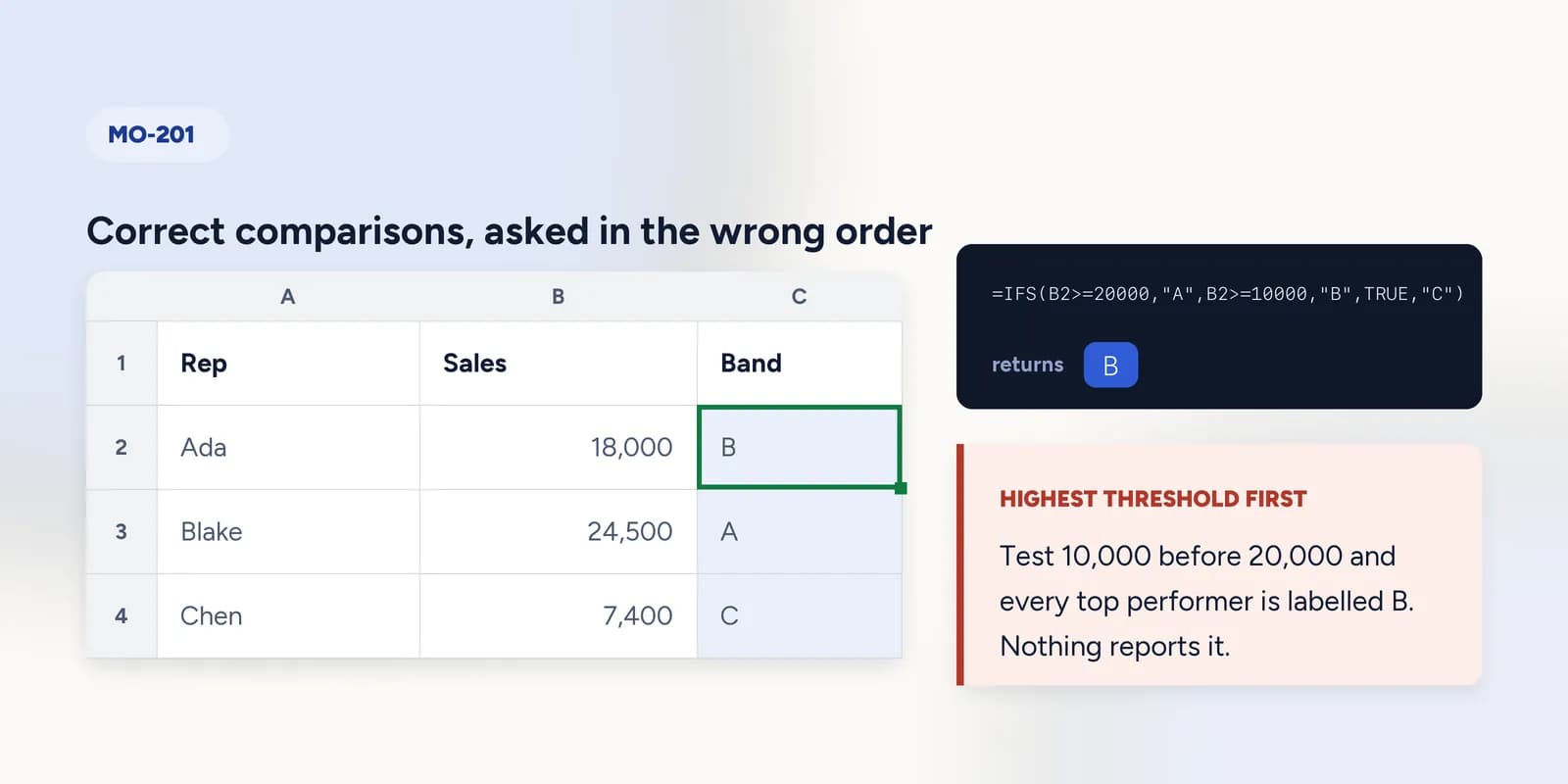
- Nested logical functions, and the band ordering that makes a stack of correct comparisons produce wrong labels.
- The lookup family: VLOOKUP, HLOOKUP, XLOOKUP, and INDEX with MATCH, including when each is the right choice.
- Conditional aggregation with SUMIFS, COUNTIFS, AVERAGEIFS, MAXIFS and MINIFS.
- Error handling with IFERROR and IFNA, and the difference between them.
- Date functions, and the fact that a date is a count of days, which is what makes date arithmetic work at all.
- Text functions used to repair imported data before anything else can match it.
The closest thing on this site to an Expert formula task: bands, a conditional total and a lookup, in one sheet, with nothing told to you twice.
Challenge: build a commission model
A banded lookup, a locked table and a minimum payment rule, in one model that has to work for every row. · 12 min · Paid plan
The rest of it, which needs Excel
Most of MO-201 is outside what a browser grid can offer, and the absences here are deliberate design rather than a roadmap. Preparing for those domains means opening Excel.
- Macros. Recording one, editing it, and saving a macro-enabled workbook. Not implemented here at all.
- PivotTables with calculated fields, grouping and slicers. There is a small PivotTable builder on this site, one row field and one value field, which teaches the idea and none of the exam's operations.
- Formula-driven conditional formatting rules and custom number formats.
- Data validation, workbook and worksheet protection, and links between workbooks.
- The formula auditing tools: trace precedents and dependents, evaluate formula, the watch window.
- Advanced chart types and PivotCharts.
- 1Open Microsoft's skills-measured document for MO-201 and treat every sub-point as a checklist item to perform once in a real workbook.
- 2Start with the items you have never done rather than the ones you are good at. For most candidates that is macros, data validation and the auditing tools.
- 3Build one PivotTable with a calculated field and one with grouped dates. Both are formulaic once done, and both appear reliably.
- 4Record a macro, look at what it produced, and save the workbook in the macro-enabled format. The exam cares that you can do it, not that you can write code.
- 5Then drill the advanced formulas, where repetition is what helps and a browser is as good as Excel for the thinking.
Whether to take it
Worth asking before paying the fee, because the honest answer is not always yes.
- Take MO-200 first unless you already do this work daily. Associate is the level most job adverts mean when they ask for Excel skills.
- Expert is worth it when a role names it, when an employer is paying, or when you want a structured reason to learn the parts of Excel you have been avoiding. The syllabus is a good curriculum even if you never sit the exam.
- It is worth less as a signal than a portfolio of work in most hiring conversations, and more than nothing when a CV needs something concrete on it.
What goes wrong
These are the four mistakes that come up again and again. Each one is reasonable. That is why people make it.
Preparing for Expert the way you prepared for Associate.
WhySame exam family, same format, so the same method seems to apply.
InsteadThe ratio is different. Associate is mostly things you already do; Expert is mostly things you have avoided. Audit the syllabus for what you have never done and start there.
Skipping macros because you do not write code.
WhyThe word macro suggests programming.
InsteadThe exam asks you to record, run and save one, not to write VBA from scratch. It is an afternoon, and it is marks.
Treating PivotTables as a chart feature.
WhyThey usually arrive alongside charts in a course.
InsteadCalculated fields and grouping are their own skills and are tested as such. Build several from real data before the exam.
Assuming a formula-practice site covers Expert.
WhyAdvanced formulas is one of the four domain names, which makes it sound like the bulk.
InsteadIt is one domain, and even within it the what-if tools and the auditing tools need the software. Use browser practice for the formula reasoning and Excel for everything else.
Common questions
What is the MO-201 exam?
The Microsoft Office Specialist: Excel Expert certification exam. It is performance-based, taken inside Excel, and covers workbook options and settings, advanced data formatting, advanced formulas and macros, and advanced charts and tables.
What is the difference between MO-200 and MO-201?
MO-200 certifies competent everyday Excel: tables, formatting, the common functions, charts. MO-201 adds the things a workbook other people depend on needs, protection, validation, auditing, macros, PivotTables with calculated fields and advanced charts.
Do I need MO-200 before MO-201?
Not formally. Whether to take both is a question about money and about how much of the Associate material you already know, rather than a rule. Most candidates benefit from sitting Associate first.
How long is the MO-201 exam?
Around fifty minutes, in line with the other Microsoft Office Specialist exams, but confirm the current duration on Microsoft's official exam page when you book rather than relying on a third-party figure.
Can I practise MO-201 in a browser?
The advanced formula reasoning, yes, and that is worth doing because it is the part repetition helps. Macros, PivotTable calculated fields, data validation, protection and the auditing tools all need Excel itself, and they are the larger share of the exam.