
Dates, and the difference between rounding and displaying
Excel stores a date as a number counting days from a fixed starting point, and the date you see is that number wearing a format. This is why subtracting one date from another gives you a plain number of days, why a date typed as text does nothing useful, and why sorting dates stored as text puts them in alphabetical order.

A date in Excel is a number counting days, dressed up by formatting. Once that one fact lands, pulling the month out of a date and working out the gap between two of them both stop being mysterious and become arithmetic.
ROUND is in the same part for a reason that is not obvious at first. Both ideas are about the same trap: what a cell shows you and what a cell contains are two different things, and totals built on the difference between them do not add up.
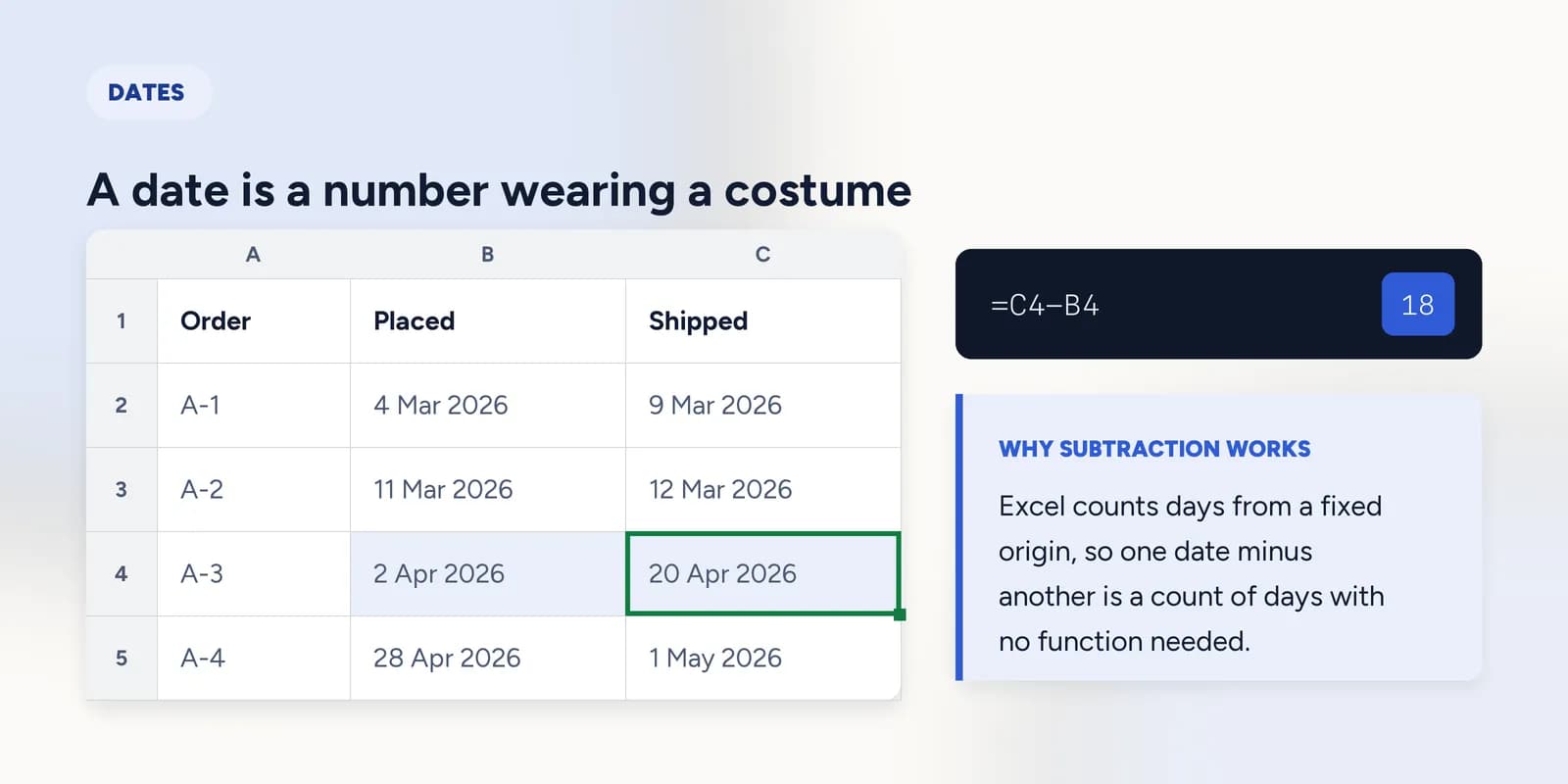
A date is a number wearing a costume
Excel counts days from a fixed origin. Every date is that count, and the familiar form on screen is a format applied to it. Change the cell's format to General and the costume comes off, leaving a five-digit number.
| A | B | C | D | |
|---|---|---|---|---|
| 1 | Order | Placed | Shipped | Value |
| 2 | A-1 | 4 Mar 2026 | 9 Mar 2026 | 128.449 |
| 3 | A-2 | 11 Mar 2026 | 12 Mar 2026 | 64.201 |
| 4 | A-3 | 2 Apr 2026 | 20 Apr 2026 | 310.775 |
| 5 | A-4 | 28 Apr 2026 | 1 May 2026 | 92.338 |
=C4-B4Shipped minus placed, in days. No function needed: subtracting two counts of days gives a count of days.
Pulling a date apart
YEAR, MONTH and DAY each take a date and return one number out of it. The usual reason to want them is grouping: a column of months is what lets a pivot table or a SUMIF total by month.
=MONTH(B4)April, as the number 4. MONTH returns a number, not a name.
=TEXT(B4,"0")The same date with its costume removed: the underlying count of days since Excel's origin.
WEEKDAY is the one that catches people. By default it numbers Sunday as 1, so a Monday comes back as 2, and a formula testing for weekend days written on the assumption that Monday is 1 will be wrong by one day for every row. The second argument changes the convention.
ROUND changes the value, formatting does not
Showing two decimal places does not make a number have two decimal places. The cell still holds everything it held before, and the hidden digits are still in every total built from it. This is how a column of figures that all look right adds up to something one penny off.
=SUM(D2:D5)The true total, with all the decimals the values actually carry.
=ROUND(D2,2)+ROUND(D3,2)+ROUND(D4,2)+ROUND(D5,2)Each value genuinely rounded first, then added. Different from the figure above, and this is the one that agrees with what a reader sees in the column.
What goes wrong
These are the mistakes this part exists to prevent. Each one is reasonable, which is why people make it and why nothing on the sheet objects.
Typing a date and assuming Excel understood it
WhyIt usually does, and the cell looks identical either way until a date function is pointed at it.
InsteadCheck the alignment, or use DATE(year, month, day) when it matters. Text dates sort alphabetically, which puts 1 November before 2 March.
Assuming WEEKDAY calls Monday 1
WhyMonday is the first day of the week in most of the world, and the function returns a number with no label to contradict you.
InsteadSunday is 1 by default. Pass 2 as the second argument for Monday-first numbering, and test against a date whose weekday you know.
Formatting to two decimals and treating it as rounded
WhyThe column looks rounded, every figure reads correctly, and the error is a penny at a time.
InsteadUse ROUND where the value is actually decided. Formatting is for the reader; ROUND is for the arithmetic.
Common questions
How do I calculate days between two dates in Excel?
Subtract one from the other: =C4-B4. Because a date is a count of days, the result is a plain number of days. DAYS(end, start) does the same thing with the arguments named.
Why does my date show as a number in Excel?
The cell's format was changed to General, which strips the costume off and shows the underlying day count. Set the format back to Date and the familiar form returns; the value never changed.
How do I get the month from a date in Excel?
=MONTH(A2) returns a number from 1 to 12. For a month name, use =TEXT(A2,"mmmm"), which returns text rather than a number.
What is the difference between ROUND and formatting a cell?
ROUND changes the stored value. Formatting changes only what is printed, leaving the hidden decimals in place to turn up in every total built from the cell.
Why is my date sorting in the wrong order?
The dates are stored as text, so they are being sorted alphabetically: 1 November comes before 2 March. Convert the column to real dates with DATEVALUE or by re-entering them, and the order fixes itself.